|
iFileRecovery will do an amazing job when the data loss disaster strikes, especially when you
want to recover data from a hard drive. iFileRecovery supports hard drive, USB drive, SD card,
memory card, and other storage devices. It provides the comprehensive data recovery solution for Windows users to
recover lost data.
If you deleted files by mistake or found files lost, please stop doing any change to the
partition immediately to avoid possible damage of the file system. A successful recovery of
lost or deleted files depends on certain factors like Intact File system, No Fragmentation
after files deleted, The availability of data , etc. When a file is deleted its actual
contents remain intact initially. However, in the partition's book-keeping of clusters in use
by the file, these clusters are marked as free for use. The deleted file's filename is modified
so the deleted file no longer appears in the directory list. As it is no longer known exactly
what clusters 'belonged' to the deleted file, the successful recovery of files that were not
stored in consecutive clusters is uncertain. If fragmentation rate is high, the chances of a
successful recovery will become lower and lower.
After a file is deleted, it could be damaged by another file, overwriting, disk defragmentation,
virus attack, or hacking activities, etc. Some large files are saved in discrete locations
because they cannot secure contiguous hard disk space. When one of these files is deleted,
recovery is very difficult. Even though the file's start location is available, the location
information of other fragments is usually erased. When damaged or fragmented files found, the
recovered files may be incorrect or unrecognizable. Try to keep the files' status and don`t
break them. So, the best way is to stop use the hard drive immediately, especially when the lost
files are in the same drive as where the operating system was installed. You may disconnect the
hard drive from computer and connect it to another computer as an external drive only for
scanning and reading purposes, these operations won`t break the file system on the hard drive,
so the hard drive will always keep the best status for scanning and recoverying. By this way,
if the software you are using can`t find or recover the deleted files, you still have the chance
to try other products, it will only cost you time, it won`t damage your valuable files.
Whatever tool you use to recover files, don`t copy, unzip or install the tool to the partition
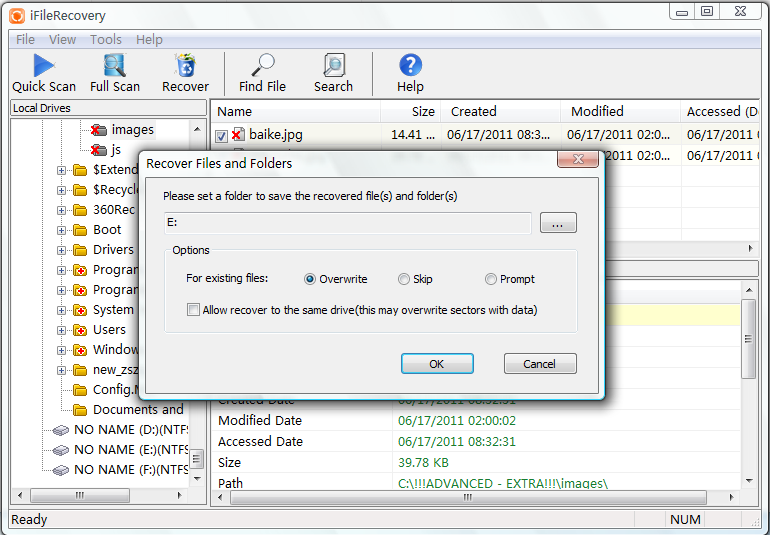
where the files were deleted, and don`t save the recovered files to the same drive from which
you recover files!
iFileRecovery for Windows Key Features:
- Easily recover the whole folder with all files under it as long as the original data are not damaged or fragmented, and the folder structure will also keep unchanged.
- Easily recover deleted documents, photos, video, music and folders.
- Supports two scan modes: quick scan and full scan.
- Recovers files and folders deleted bypassing Recycle Bin.
- Find and recovers deleted files and folders from NTFS and FAT-formatted volumes.
- Recovers files and folders deleted from the DOS command prompt.
- Recovers files and folders deleted when you press Shift+Delete on the keyboard.
- Recovers files deleted even after you have emptied the Recycle Bin.
- Recovers files and folders deleted when you use Move or Cut command.
- Recovers files and folders deleted in other applications or by viruses.
- Supports recover files from formatted or reformatted disk.
- Supports a variety of media including hard drives, memory cards, USB flash storage and removable media.
- An easy to use Explorer-like interface, including advanced search capabilities.
- Filters files by name, extension, folder and file type.
- Supports standard IDE/ATA/SCSI hard drives.
- Recover archived, hidden, encrypted, compressed files.
- Performs non-destructive and read-only scan and deleted file recovery.
- Built-in hex editor.
- iFileRecovery is designed for running under Windows 11, 10, 8, 7, Vista, XP.
- Easy to use, no special user skills required.
 System Requirements:
- Windows 11, 10, 8, 7, Vista, XP
- RAM: 256 MB or higher
- Hard Disk: minimum 500 MB of free space required for installation
- Display: 640 x 480 or higher resolution
 Tip: For correct working on Windows 7, 8, 10 and 11, Please start the product using right clicking on the product icon,
and selecting "Right as Administrator" menu item. the operation will enable user access to physical devices under Windows 7 / 8 / 10 / 11.
Tip: For correct working on Windows 7, 8, 10 and 11, Please start the product using right clicking on the product icon,
and selecting "Right as Administrator" menu item. the operation will enable user access to physical devices under Windows 7 / 8 / 10 / 11.
|


 This product is fantastic, it does exactly what it says it will, and is so easy to set up and use.
Thanks!
This product is fantastic, it does exactly what it says it will, and is so easy to set up and use.
Thanks!
 Data Recovery Pro for Windows
 SD Card Recovery for Windows
 Photo Recovery for Windows
 Photo Recovery for Mac